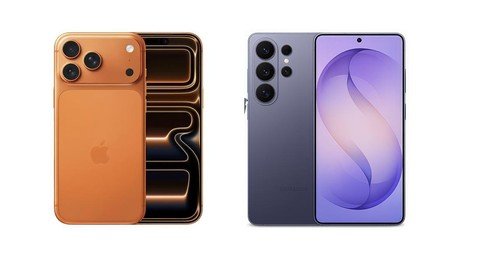
iPhone 17 Pro vs Samsung Galaxy S26 Ultra: Which Flagship Is Better?
549 views
A flagship phone can look perfect on a spec sheet and still annoy you by lunchtime. Maybe the camera takes a second too long to switch lenses. Maybe the battery drops faster than expected after a day of 5G, maps, photos, and Bluetooth. Or maybe you discover that the feature you actually need is buried three menus deep.
That’s the real fight here.
The iPhone 17 Pro and Samsung Galaxy S26 Ultra represent two very different ideas of a premium smartphone: Apple leans toward tight hardware-software integration and a controlled ecosystem, while Samsung brings a larger display, more camera hardware, an S Pen, and considerably more room to customize the experience.
The question isn’t simply which one has the bigger number beside the camera or battery.
It’s which flagship makes your daily life easier.
For PhoneTrend readers comparing the latest top-tier phones rather than repeating another generic “Apple vs Android” argument, this is the more useful angle: where each device wins after the initial excitement wears off.
iPhone 17 Pro vs Galaxy S26 Ultra: the numbers that actually matter
Feature | iPhone 17 Pro | Samsung Galaxy S26 Ultra |
|---|---|---|
Display | 6.3-inch OLED, up to 120Hz | 6.9-inch QHD+ Dynamic AMOLED 2X, 1–120Hz |
Resolution | 2622 × 1206, 460 ppi | 3120 × 1440 |
Processor | Apple A19 Pro | Snapdragon 8 Elite Gen 5 for Galaxy |
Rear cameras | Triple 48MP system | 200MP + 50MP + 50MP + 10MP |
Zoom | Apple multi-camera telephoto system | 3x and 5x optical, up to 100x digital |
Battery claim | Up to 31 hours video playback | 5,000mAh typical capacity |
Wired charging | Up to 50% in about 20 minutes with a 40W+ adapter | Up to 75% in around 30 minutes with a compatible 60W adapter |
Storage | 256GB, 512GB, 1TB | 256GB, 512GB, 1TB |
Weight | About 204–206g, depending on regional spec listing | 214g |
Extra hardware | Action button, Camera Control, LiDAR | Integrated S Pen |
Apple lists the iPhone 17 Pro with a 6.3-inch Super Retina XDR OLED panel, adaptive ProMotion up to 120Hz, 3,000 nits of peak outdoor brightness, USB 3 speeds up to 10Gb/s, Wi-Fi 7 and Bluetooth 6.
Samsung’s Galaxy S26 Ultra counters with a 6.9-inch QHD+ display, 120Hz adaptive refresh, a Snapdragon 8 Elite Gen 5 for Galaxy chipset, up to 16GB of RAM on the 1TB model, a 5,000mAh battery, and a four-camera rear system.
Specs tell part of the story.
The rest happens in your hand.
Design and display: compact precision or maximum screen?
The iPhone 17 Pro is the easier phone to carry. At roughly 150mm tall and just under 72mm wide, it is dramatically more manageable one-handed than Samsung’s 163.6mm-tall, 78.1mm-wide Ultra.
That difference sounds minor. It isn't.
Try replying to messages while carrying a coffee, or using your phone while standing on a train. The narrower iPhone makes those small interactions less awkward.
Samsung wins the opposite battle. The Galaxy S26 Ultra gives you a huge 6.9-inch QHD+ canvas. Reading long articles, editing photos, reviewing documents, splitting apps, and watching video simply feel less cramped. The included S Pen support also changes the equation for people who annotate PDFs, sign documents, sketch rough ideas, or prefer handwritten notes.
If screen space is the priority, Samsung wins comfortably.
Apple's panel is no slouch, though. Its 460 ppi density, anti-reflective coating, Always-On functionality and 3,000-nit outdoor peak brightness make it exceptionally usable outside.
The practical choice is simple: choose the iPhone if you want a powerful phone that still behaves like a phone. Choose the S26 Ultra if you want something closer to a pocketable workstation.
Performance: both are fast, but they approach power differently
The iPhone 17 Pro uses Apple's A19 Pro, built around a 6-core CPU, 6-core GPU with Neural Accelerators, a 16-core Neural Engine, and hardware-accelerated ray tracing.
Samsung uses the Snapdragon 8 Elite Gen 5 for Galaxy, a customized flagship platform paired with 12GB of RAM on 256GB and 512GB models and 16GB on the 1TB configuration in Samsung's listed specifications.
For ordinary use, forget benchmark obsession. Both phones are absurdly fast.
The difference appears in workflow.
iOS tends to make the iPhone feel highly predictable. Open the camera, edit a Pro video clip, switch to Messages, return to the editor: the experience is tightly managed. Android on the S26 Ultra gives you more freedom, especially with multitasking, app behavior, file handling, and system-level customization.
That freedom can create friction. An Android user who installs launchers, automation tools, widgets, alternate keyboards, and aggressive battery-management settings can occasionally end up troubleshooting their own setup. Samsung has made this easier over the years, but the possibility remains.
Apple gives you fewer knobs.
Samsung gives you the toolbox.
Camera battle: Samsung wins flexibility, Apple still has a serious edge
This comparison gets interesting fast.
The Galaxy S26 Ultra has a 200MP main camera, 50MP ultra-wide camera, 50MP 5x telephoto, and 10MP 3x telephoto. Samsung also advertises 2x and 10x “optical quality” zoom through its Adaptive Pixel processing, plus up to 100x digital zoom.
That is a lot of range.
At a concert, sporting event, or while photographing a distant building, Samsung gives you more framing options without physically moving closer. The separate 3x and 5x optical cameras are particularly useful because they cover common portrait and telephoto distances.
Apple takes a different route. The iPhone 17 Pro’s camera advantage is less about winning a megapixel contest and more about consistency, computational photography, and integration with its professional video workflow.
Apple also supports Camera Control, letting users adjust options such as exposure, depth, zoom, cameras, styles, and tone from the dedicated control system.
For video creators, the iPhone deserves serious attention. USB 3 support up to 10Gb/s is useful when moving large files, and Apple's Pro-focused camera workflow remains a practical reason many creators stick with the platform.
My take:
Best zoom and photographic versatility: Galaxy S26 Ultra
Best compact creator phone: iPhone 17 Pro
Best for distant subjects: Galaxy S26 Ultra
Best if you regularly move footage into an Apple-based workflow: iPhone 17 Pro
A 200MP sensor doesn't automatically produce a better photo every time. Lighting, shutter timing, processing, motion, lens selection, and how quickly the camera app responds matter just as much.
That last part is easy to forget until your dog stops moving.
Battery and charging: Samsung makes charging less of a waiting game
Apple rates the iPhone 17 Pro for up to 31 hours of video playback and says it can reach 50% in around 20 minutes using a 40W or higher adapter and USB-C cable. MagSafe charging can also reach 25W, with Apple's published testing indicating roughly 50% in 30 minutes using a compatible 30W adapter or higher.
Samsung specifies a 5,000mAh typical battery and up to 60W wired charging, claiming around 75% in 30 minutes with a compatible adapter. Wireless charging reaches up to 25W, and Wireless PowerShare can charge compatible accessories or another device.
Real battery life will vary wildly with signal strength, camera use, gaming, screen brightness, and background apps. A weak 5G connection can punish either phone.
Still, Samsung has the more aggressive charging setup.
If you frequently realize at 8:20 a.m. that your phone is sitting at 18%, that matters.
Software and AI: ecosystem convenience versus customization
The iPhone 17 Pro runs Apple's software environment and supports Apple Intelligence, which Apple integrates across apps and system experiences with privacy protections that include on-device processing and related privacy architecture.
Samsung's S26 Ultra is built around Galaxy AI and Android's broader ecosystem, with Samsung emphasizing multimodal and cross-app AI experiences in the S26 series.
Neither platform is friction-free.
Apple's ecosystem is incredibly convenient if you already use a Mac, Apple Watch, AirPods, iPad, AirDrop, FaceTime, and iCloud. Moving to Samsung can mean replacing habits you didn't realize were connected.
The reverse is also true. Switching from a Galaxy phone can mean losing flexible file management, deep home-screen customization, Samsung's multitasking options, S Pen functionality, and the ability to shape the interface around your preferences.
Here's the deciding test: look at the other devices you use every day.
Your phone doesn't live alone.
Storage, connectivity, and the small details buyers miss
The iPhone 17 Pro starts at 256GB and goes up to 1TB. The Galaxy S26 Ultra also offers 256GB, 512GB, and 1TB variants, although Samsung's RAM configuration can vary by capacity and market.
There is no microSD card slot in this flagship comparison, so buy storage based on your actual habits rather than optimism.
Shoot lots of 4K video? Start at 512GB.
Download large games, keep offline media, and shoot frequently? 1TB may be justified.
Apple also includes Wi-Fi 7, Bluetooth 6, Thread, second-generation Ultra Wideband, and 5G with sub-6GHz support on the iPhone 17 Pro.
These aren't glamorous features. They become useful years later, especially as routers, smart-home accessories, trackers, and wireless accessories catch up.
Which flagship should you actually buy?
Buy the iPhone 17 Pro if you want:
A more compact flagship that is easier to use one-handed.
Strong video tools and fast USB 3 file transfers.
Tight integration with Mac, iPad, Apple Watch, AirPods, FaceTime, and other Apple services.
A consistent, controlled software experience.
MagSafe and Qi2 charging up to 25W.
Buy the Samsung Galaxy S26 Ultra if you want:
A huge high-resolution display, S Pen support, more aggressive wired charging, 3x and 5x optical zoom, up to 100x digital zoom, extensive customization, and a device that can handle phone, camera, note-taking, and productivity duties without pretending those are all the same thing.
For most people who want the most versatile hardware, the Galaxy S26 Ultra is the more capable device.
But “more capable” isn't always “better for you.”
The iPhone 17 Pro is arguably the smarter purchase for someone who values size, ecosystem integration, reliable day-to-day behavior, and a polished creator workflow. It does less in some areas by design. For plenty of buyers, that's a feature.
FAQs
Is the Galaxy S26 Ultra better than the iPhone 17 Pro?
For display size, zoom flexibility, S Pen functionality, and charging speed, yes. The iPhone 17 Pro is better suited to buyers who prefer a compact design and rely heavily on Apple's ecosystem.
Which phone has the better camera?
Samsung has the stronger zoom hardware, including dedicated 3x and 5x telephoto cameras. The iPhone 17 Pro remains a compelling choice for creators who prioritize Apple's video workflow and consistent integration with professional tools.
Which charges faster?
The Galaxy S26 Ultra. Samsung rates it for up to 75% charge in around 30 minutes with a compatible 60W adapter, while Apple rates the iPhone 17 Pro for up to 50% in around 20 minutes with a 40W or higher adapter.
Does the iPhone 17 Pro support Wi-Fi 7?
Yes. Apple lists Wi-Fi 7 (802.11be) with 2x2 MIMO, alongside Bluetooth 6.
Should you choose 256GB, 512GB, or 1TB?
256GB is fine for typical users. Choose 512GB if you regularly shoot high-resolution video or keep large game and media libraries locally. For heavy video creators who prefer keeping projects on-device, 1TB is the safer long-term option.
The best move now is to ignore the marketing scorecard for a minute and check your actual habits: screen time, photo storage, laptop platform, earbuds, smartwatch, and the apps you use every morning. Then buy the flagship that removes the most friction from that routine—not the one that merely wins the longest spec list.
iPhone 17 Pro vs Galaxy S26 Ultra
flagship phone comparison
smartphone reviews 2026
Apple vs Samsung
best premium phone
Found this helpful? Share it!